
Welcome to Buyers Lab Resources
HopeDez DTF Buyers Lab™
This is where you will discover valuable
reading material as you begin your equipment ownership journey
No DTF Hype
In Here You Will Learn What Most DTF Buyers Discover Too Late

The HopeDez Buyers Decision System™
An overview of the three tools

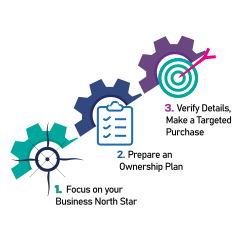
Start Here: Step 1
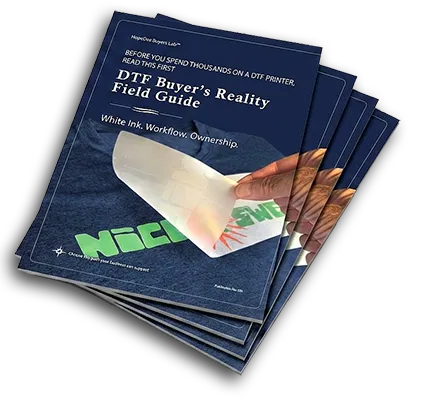
Download: HopeDez DTF Buyers Reality Field Guide™
THE STANDARD
Every purchase earns its evidence.
The printer is only one part of the ownership system.

First, The Buyer's Reality Field Guide™ is focused on helping
determine what your current business can support.
The Buyer's Reality Field Guide™ demonstrates what changes when moving from DTG vs. DTF.
The guide also...
Translates the sales promise into reality.
Covers low-volume printer maintenance considerations.
Reveals the importance of white ink maintenance - whether "automatic" or not.
Provides the buyer with a targeted list of "reveal" questions to ask any seller.
Ensures your workspace is sufficient for efficient production.
Reviews the hidden costs of production problems.
Outlines ownership equipment risk.
Lays out a Day-1 readiness plan.
Prepares you for a well-planned decisive purchase.

Next: Step 2
Download: HopeDez Buyers Readiness Assessment™
KNOW THE WORK
The right knowledge gives buyers more control.
What happens before, during, and between jobs.

Next, The Buyers Readiness Assessment™ is an interactive tool measuring the readiness of your DTF business.
The Readiness Assessment™ tallies your strengths & weaknesses resulting in a Buy, Wait or Outsource decision.
It evaluates your Business Readiness.
1. Purpose & Vision
2. Customer & Market
3. Sales & Operations
4. Financial FoundationIt evaluates your Production Readiness.
1. Workspace & Environment
2. Workflow & Production
3. Supplies & Inventory
4. Maintenance ReadinessIt evaluates your Technical Readiness.
1. Computer Skills
2. Artwork Preparation
3. RIP & Color
4. Troubleshooting SkillsIt evaluates your Financial Readiness.
1. Total Investment
2. Operating Costs
3. Cash Flow & Reserves
4. Payback & ProfitIt evaluates your Ownership Readiness.
1. Time & Commitment
2. Learning Mindset
3. Consistency & Discipline
4. Ownership Expectations

Concluding: Step 3
Download: DTF Seller Verification Workbook™
KNOW THE PROOF
Demonstration prints are always nearly perfect.
The printer is only one part of the ownership system.

Concluding the set, The Seller Verification Workbook™ is another interactive tool that goes behind the sales demo outlining what true complete ownership entails.
The Seller Verification Workbook™ validates the
complete decision progress with multiple interactive sections.
SECTION 1: Using the workbook
A Four Step Plan1.) Ask
2.) Record
3.) Request
4.) Compare
A successful demonstration shows what the equipment is capable of under prepared conditions.
It does not explain what your business will experience on a daily basis.
*BONUS: Included in this section are four identical interactive pages to be used at any show or
sales event for easy system-to-system comparison.SECTION 2: Seller and Equipment Record
1. Pertinent seller information
2. Details of system being quoted
3. Configuration Includes
4. Demonstration details
Here you can make record of what is included, what remains optional, and what is sold separately.SECTION 3: White Ink and Daily Maintenance
1. What happens to idle white ink?
2. Is there auto-maintenance for white ink components?
3. What pre-production routines should be done?
4. What needs to be monitored during production?
A white-ink feature does not replace the operator's responsibility to verify print readiness.SECTION 4: Nozzle Check and Production Recovery
1. Production-ready standard
2. Identifying output problems
3. Healthy baseline records
A nozzle check is a production-permission test - not a disposable piece of film.SECTION 5: Environment and Workspace
1. Documented working environment
2. Environment monitoring requirements
3. Airflow and off hours control
Environmental conditions can make or break a good day's production.SECTION 6: Consumables and Compatibility
1. Approved consumable system
2. Storage & shelf-life limits
3. Substitution and support effects
4. Availability and lead time
5. Supply-interruption plan
Compatibility protects output. Supply continuity protects the business.SECTION 7: Software and Color Workflow
1. RIP and licensing info
2. Computer & installation needs
3. Software support responsibility
4. Profile and preset records
5. Color correction responsibility
The printer, RIP, computer, profiles, and license must function as one supported system.SECTION 8: Training and Operational Support
1. Training record
2. Workflow coverage
3. Operator verification
4. Documented support sequence
5. Support terms
6. Service and escalation
Support must be defined before a stopped printer becomes a customer problem.SECTION 9: Warranty and Service
1. Documented warranty terms
2. What is actually covered
3. Documented service path
4. Owner costs
5. Downtime and parts
A warranty does not prevent downtime. The service process determines how long it lasts.SECTION 10: Real Ownership Cost
1. Total cost to begin
2. Monthly operating estimate
3. Risk and reserve
The lowest printer price may not create the lowest ownership cost.SECTION 11: Business Continuity
1. Backup production path
2. Backup costs
3. Customer response
One stopped printer should not stop the entire business.SECTION 12: Final Seller Decision
1. Finalist record
2. Final last check stage
3. Final decision
4. Next action
The right printer must fit the business after the demonstration ends.


Start with Clarity
Get the facts before you invest


Understand Ownership
See the full picture from top to bottom


Operate with Consistency
Habits produce consistent results

A Better DTF Decision Starts Before The Printer Arrives
Learn what to expect before you commit your money, workspace, and time.